Tdarr
I use tdarr to standardize my video media library. I will monitor the folders you point it at and perform a series of action upon that file according to a script.
The docker compose looks like this:
services:
  tdarr:
    container_name: tdarr
    image: ghcr.io/haveagitgat/tdarr:latest
    restart: unless-stopped
    network_mode: bridge
    ports:
      - 8265:8265
      - 8266:8266
    environment:
      - TZ=America/New_York
      - PUID=1000
      - PGID=1000
      - UMASK_SET=002
      - serverIP=0.0.0.0
      - serverPort=8266
      - webUIPort=8265
      - internalNode=true
      - inContainer=true
      - ffmpegVersion=6
      - nodeName=Tdarr
    volumes:
      - /mnt/media:/media
      - /tmp:/temp
      - /var/lib/tdarr/configs:/app/configs
      - /var/lib/tdarr/logs:/app/logs
      - /var/lib/tdarr/server:/app/server
The temp directory is mounted to my NAS due to the fact that you can add more than one worker to complete tasks. If you had a large media library that needed processing or intake a large volume of files, you can distribute this work accross multiple computers. In order for this to work properly, all tdarr instances need to be able to see all of the directories in the same way.
The flow I currently use for all media looks like this:
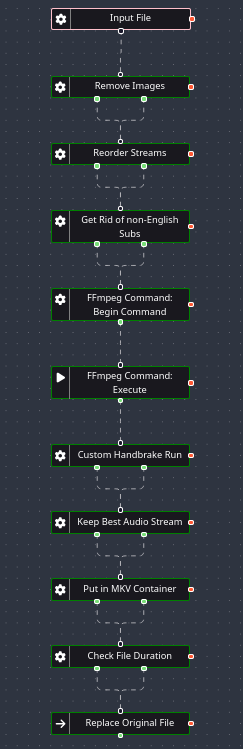
It removes images from the file, reorders the streams (video, audio, subtitles), and eliminates non-English subtitles. It then runs the video through a custom handbrake configuration that looks like this:
{
    "PresetList": [
        {
            "AlignAVStart": false,
            "AudioAutomaticNamingBehavior": "unnamed",
            "AudioCopyMask": [
                "copy:ac3",
                "copy:alac"
            ],
            "AudioEncoderFallback": "ac3",
            "AudioLanguageList": [
                "eng"
            ],
            "AudioList": [
                {
                    "AudioBitrate": 640,
                    "AudioCompressionLevel": 0.0,
                    "AudioDitherMethod": "auto",
                    "AudioEncoder": "ac3",
                    "AudioMixdown": "5point1",
                    "AudioNormalizeMixLevel": false,
                    "AudioSamplerate": "48",
                    "AudioTrackDRCSlider": 2.0,
                    "AudioTrackGainSlider": 0.0,
                    "AudioTrackQuality": 0.0,
                    "AudioTrackQualityEnable": false
                }
            ],
            "AudioSecondaryEncoderMode": false,
            "AudioTrackNamePassthru": true,
            "AudioTrackSelectionBehavior": "all",
            "ChapterMarkers": true,
            "ChildrenArray": [],
            "Default": true,
            "FileFormat": "av_mkv",
            "Folder": false,
            "FolderOpen": false,
            "InlineParameterSets": false,
            "MetadataPassthru": true,
            "Mp4iPodCompatible": false,
            "Optimize": false,
            "PictureAllowUpscaling": false,
            "PictureAutoCrop": true,
            "PictureBottomCrop": 0,
            "PictureChromaSmoothCustom": "",
            "PictureChromaSmoothPreset": "off",
            "PictureChromaSmoothTune": "none",
            "PictureColorspaceCustom": "",
            "PictureColorspacePreset": "off",
            "PictureCombDetectCustom": "",
            "PictureCombDetectPreset": "default",
            "PictureCropMode": 0,
            "PictureDARWidth": 1920,
            "PictureDeblockCustom": "strength=strong:thresh=20:blocksize=8",
            "PictureDeblockPreset": "off",
            "PictureDeblockTune": "small",
            "PictureDeinterlaceCustom": "",
            "PictureDeinterlaceFilter": "decomb",
            "PictureDeinterlacePreset": "default",
            "PictureDenoiseCustom": "",
            "PictureDenoiseFilter": "off",
            "PictureDenoisePreset": "",
            "PictureDenoiseTune": "none",
            "PictureDetelecine": "off",
            "PictureDetelecineCustom": "",
            "PictureForceHeight": 0,
            "PictureForceWidth": 0,
            "PictureHeight": 1080,
            "PictureItuPAR": false,
            "PictureKeepRatio": true,
            "PictureLeftCrop": 0,
            "PictureModulus": 2,
            "PicturePAR": "auto",
            "PicturePARHeight": 1,
            "PicturePARWidth": 1,
            "PicturePadBottom": 0,
            "PicturePadColor": "black",
            "PicturePadLeft": 0,
            "PicturePadMode": "none",
            "PicturePadRight": 0,
            "PicturePadTop": 0,
            "PictureRightCrop": 0,
            "PictureRotate": "angle=0:hflip=0",
            "PictureSharpenCustom": "",
            "PictureSharpenFilter": "off",
            "PictureSharpenPreset": "",
            "PictureSharpenTune": "",
            "PictureTopCrop": 0,
            "PictureUseMaximumSize": false,
            "PictureWidth": 1920,
            "PresetDescription": "",
            "PresetDisabled": false,
            "PresetName": "BluRay",
            "SubtitleAddCC": false,
            "SubtitleAddForeignAudioSearch": true,
            "SubtitleAddForeignAudioSubtitle": false,
            "SubtitleBurnBDSub": false,
            "SubtitleBurnBehavior": "foreign",
            "SubtitleBurnDVDSub": false,
            "SubtitleLanguageList": [
                "eng"
            ],
            "SubtitleTrackNamePassthru": true,
            "SubtitleTrackSelectionBehavior": "all",
            "Type": 1,
            "UsesPictureFilters": true,
            "VideoAvgBitrate": 0,
            "VideoColorMatrixCodeOverride": 0,
            "VideoColorRange": "limited",
            "VideoEncoder": "x265",
            "VideoFramerate": "auto",
            "VideoFramerateMode": "cfr",
            "VideoGrayScale": false,
            "VideoHWDecode": 0,
            "VideoLevel": "auto",
            "VideoMultiPass": false,
            "VideoOptionExtra": "",
            "VideoPasshtruHDRDynamicMetadata": "all",
            "VideoPreset": "fast",
            "VideoProfile": "auto",
            "VideoQualitySlider": 20.0,
            "VideoQualityType": 2,
            "VideoScaler": "swscale",
            "VideoTune": "",
            "VideoTurboMultiPass": false,
            "x264Option": "",
            "x264UseAdvancedOptions": false
        }
    ],
    "VersionMajor": 72,
    "VersionMicro": 0,
    "VersionMinor": 0
}
Next, it only keeps the best audio stream, converting that audio stream to ac3. Finally it puts the video in a mkv container, checks to duration, and replaces the original file.
This works on the vast majority of video files without issue, however there are some unique instances where I will have to manually run the video through handbrake on my desktop. But this is pretty rare.