Plex
Create Plex Container
Now that we have a place to put our media, we can finally create our Plex container. Navigate to Dockge's web interface. Containers are created using docker compose and is very straightforward.
Simply click on the "+ Compose" button in the top left and in the compose box to the right, enter the compose information. You can give the stack a name and then simply hit "Deploy".
I am going to be using the image provided by linuxserver.io as they are stable and work well. The documentation can be found here.
Here is my docker compose file:
services:
  plex:
    image: lscr.io/linuxserver/plex:latest
    container_name: plex
    network_mode: host
    environment:
      - PUID=1000
      - PGID=1000
      - TZ=America/New_York
      - VERSION=docker
#    - PLEX_CLAIM= If you are migrating an existing instance, use the claim code here
    volumes:
      - /mnt/media:/media
      - /mnt/public:/public
      - /var/lib/plexmediaserver:/config
    devices:
      - /dev/dri:/dev/dri
    restart: unless-stopped
First, note the UID and GID. If you are using the user created when installing Ubuntu, these will always be 1000. If you have created another user to run Plex, you can look up the PUID and PGID of the user by:
Be sure to set the correct timezone. You can look up the correct timezone here.
The PLEX_CLAIM option is used if you are migrating an existing Plex server.
Here I have mapped the folder with the NFS storage mounted to it (/mnt/media) to a /media folder inside of the Plex container. I have also mounted a "public" share that all of my users have access to. This contains photos and movies that we have recorded so they can be viewed through Plex.
I have also mapped the /config folder inside of the container to a folder in the /var/lib folder on the host. I prefer to mount the config files to a location in the /var/lib folder as this is where applications directly installed on Linux normally store their configuration data. I had originally had Plex installed using the deb package, but converted over to docker by very simply pointing the container at the existing folder for Plex data. This has carried forward and you will see me mounting the config data folders for containers to the /var/lib folder.
Finally, network_mode: host gives the container direct access to the operating systems network interface.
Once you click the deploy button, you should be able to navigate to the web interface in a browser at
You can then begin the setup process to setup the Plex server. When setting up your media libraries, you can simply select the appropriate type and then find the folder with the browser. For example, add a Movie Library and use the folder /media/movies.
If you want your Plex server to be able to stream outside of you local home network, you will need to set up a port forwarding rule in your router. This will need to direct port 32400 to the ipaddress of the Plex server.
Plex can still stream outside of the local network without this, however it will need to use a Plex relay server which has bandwidth limitations.
Change Plex Settings for Privacy Issues
Plex has been rightly criticized for a few moves where privacy concerns have become an issue. In particular, Plex by default opts into a feature called "Discover Together". This will basically send out emails to users of the Plex server broadcasting what users are watching to all other users. Secondly, Plex will collect playback data.
There is a reddit post located here that outlines how to disable these features. I will outline them here in case they ever disappear.
How to Disable Discover Together Sharing
-
Log into app.plex.tv using your web browser.
-
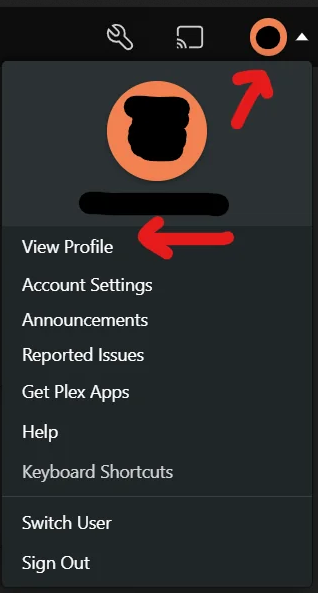
Select your profile photo in the top-right corner of the screen, then select "View Profile":
-
Select "Edit Profile".
-
Select "Manage who can see your activity".
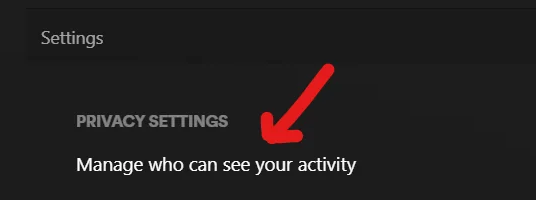
- Make sure all options are set to private. (Account Visibility defaults to "Anyone," with "Friends Only" currently being the most restrictive choice as of writing.)
How to Disable Sending Playback Data to Plex
-
Log into Plex.tv through a web browser.
-
Navigate to the privacy preferences page located here.
-
Under "Optional Playback Data," you will find "Send playback data to Plex":
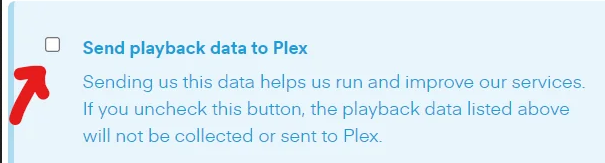
- Uncheck "Send playback data to Plex".